
E-commerce SEO starts with the catalog, not with the blog. Most of a store’s organic traffic arrives on category and product pages, and what those pages say is decided by product data rather than by an editor. The order below is the one that works: measure what is actually indexed, map intent, fix the product data itself, then set up the measurement. Teams that work in the reverse order spend months producing content and see nothing, because the pages they produced were never being crawled.
1. Start here: how many of your pages are actually indexed?
Before any strategy discussion there is one question to answer: how many URLs does the site have, how many get crawled, and how many are indexed? Search Console’s Pages report gives you all three, and the gap between them is usually startling. Finding 300,000 crawlable URLs behind a 40,000-product store is not unusual.
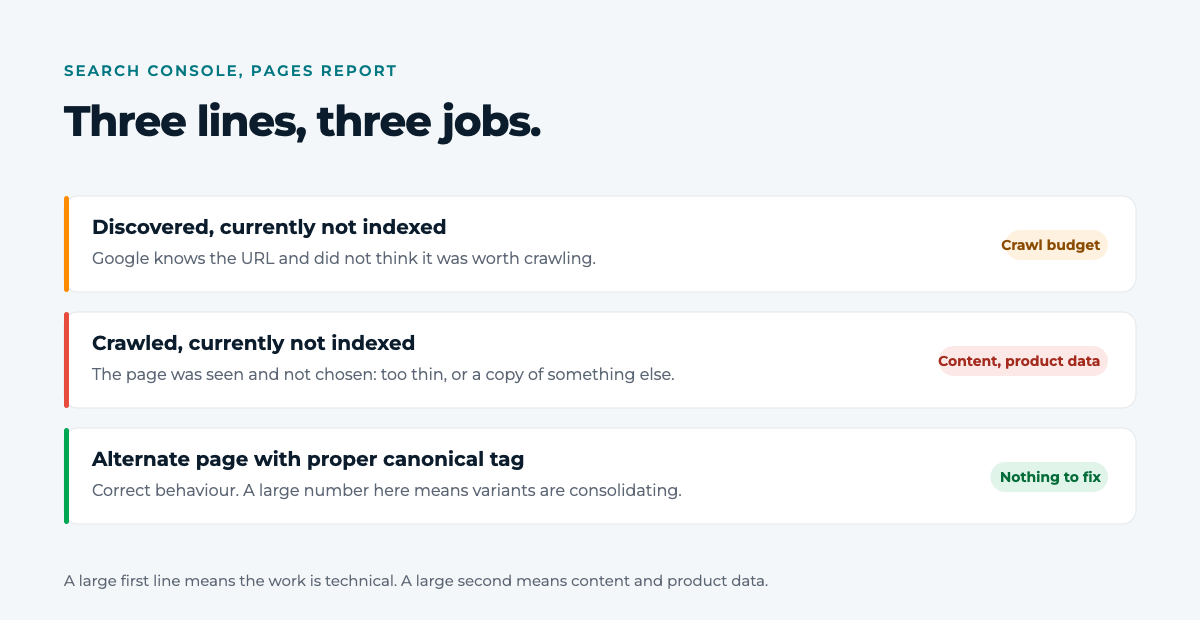
- Discovered, currently not indexed: Google knows the URL and did not think it was worth crawling. That is usually a crawl budget problem, not a content problem.
- Crawled, currently not indexed: the page was seen and not chosen. Here the content itself is the issue: either too thin, or a copy of something else.
- Alternate page with proper canonical tag: correct behaviour. A large number on this line is good news, it means your variants are consolidating.
The ratio between those three lines tells you where the next three months should go. A large first line means the work is technical. A large second line means the work is in the content and the product data.
2. Intent clusters, not a keyword list
The classic output of keyword research is a table sorted by search volume. On an e-commerce site that table is close to useless, because it does not tell you which page answers which question. Cluster by intent instead.
- Category intent (“women’s running shoes”): answered by a category page. Putting a blog post here means competing with your own category.
- Comparison intent (“road or trail running shoes”): answered by a guide, and that guide links into the category.
- Problem intent (“running shoes rubbing my heel”): answered by a short, definite page. These rarely convert, and they build the internal link network that feeds the categories.
- Brand and model intent (“specific model size 42”): answered by a product page, and winning here depends entirely on the quality of the product data.
Assign exactly one target page per cluster and write it down in a table. The moment two pages carry the same cluster, both get weaker, and that is the most common form of cannibalisation we see in store catalogs.
3. Filter and variant URLs: where the crawl budget really goes
Add colour, size, price band and sort filters to a category page and the number of combinations grows multiplicatively. Almost none of those URLs deserve to appear in a search result, and all of them get crawled.
- Sort and view parameters (
?sort=,?view=): they reorder, they do not change the content. Consolidate them onto the main category with a canonical. - Single-value filters with real demand (“black running shoes”): these are pages people genuinely search for. Leave them indexable and give each one its own title and description.
- Multi-filter combinations (“black + size 42 + mid price band”): mark them
noindex, follow. They stay crawlable so the path to the products is open, and they stop taking up room in the index. - Out-of-stock products: do not delete them. Keep the page, update the availability, list alternatives. Deleting a product page throws away every link it ever earned.
4. A product page’s content is your feed’s content
On most stores the product title, description and attributes come from one place: the product database. The same data feeds the page and the shopping feed. So a gap in the product data bleeds in two places at once, in the organic result and in Google Shopping.
Four gaps come up more than any others:
- The title distinguishes nothing. “Trainers” is identical across 400 products. A title written as brand, model, colour and size answers the long-tail query and the shopping match at the same time.
- The description is the supplier’s, verbatim. The same text sits on dozens of sites, so it earns none of them anything.
- The attributes are empty.
gtin,brand,color,sizeandmaterialare what both the structured data and the shopping match rest on. - The category is wrong. Google’s taxonomy runs to more than 5,500 categories, and picking the right branch changes match quality directly.
Checking those four by hand across 12,000 products is not a real option. Verintra’s free feed analysis exists for exactly this: you give it your feed URL, more than 30 checks run per product, and the catalog comes back graded A to F. The first score lands in about two minutes, and nothing in your source feed is changed.
5. Site search: the cheapest keyword source you own
What people type into your own search box is not an estimated volume from a third-party tool. It is your real customers’ real words, and most stores never open the report.
- Searches with no results: either a gap in the range or a vocabulary mismatch, and both are actionable. If shoppers search “raincoat” and the catalog says “parka”, the problem is the dictionary, not the stock.
- High-volume searches with no category or filter page behind them: that is an empty page opportunity with demand already attached.
- Abandonment after searching: results come back and nothing gets clicked, so the problem is listing quality. Usually the image or the title.
6. The technical floor: rendering, speed and structured data
Treat technical SEO as three questions rather than a checklist.
- Does the content exist without JavaScript? If the product name, price and description are not in the HTML the server sends, indexing them is delayed at best. Read the rendered HTML in Search Console’s live URL test, not the source in your browser.
- How long until the page is usable on a phone? Trust the field data in Search Console over a lab score. On product pages the biggest win is usually image format and deferring scripts that are not needed to render.
- Does the structured data say the same thing as the page? A price in the
Productmarkup that disagrees with the price on the page loses the rich result. Generate the markup from the same data that renders the page, never by hand.

7. Being visible in AI answers
When a generated answer appears above the results, your page is either one of its sources or it is not. There is no setting that optimises for this, but there are concrete things to do, and all of them continue directly from the points above.
- Put the answer at the top of the page. A language model skims the way a person skims: if the first paragraph does not answer the question, the page does not contain the quotable part.
- Keep the attributes complete. For a model to match “waterproof black boot in size 42” to your product, the size, colour and material fields have to be filled in. Mentioning them in the prose is not the same thing.
- Be consistent. When the product name is written one way on the page, another in the feed and a third in the structured data, the system that has to decide which is right usually picks none of them.
One honest caveat: this traffic cannot currently be isolated as its own line in analytics. Nobody can tell you how many visitors arrived from an AI answer. What you can measure is whether your catalog data is machine-readable, and that is a measurable thing.
8. What to read every week
A monthly report does not manage SEO. Four weekly numbers do.
- Indexed page count and its weekly change. If it drops, look at nothing else until you know why.
- Clicks to category pages, separated from total traffic. Total traffic is inflated by brand searches and always looks fine.
- Merchant Center disapprovals. This is the fastest read on feed health, and it moves with organic product page quality.
- Site searches with no results. The weekly top ten is next month’s content plan.
Frequently asked questions
How long before e-commerce SEO shows a result?
Technical fixes (indexing, canonicals, speed) usually read within weeks, because they change how pages that already exist get assessed. New content and intent clusters take months. That is why the order matters: producing content before fixing the technical floor puts the slowest investment first.
How long should a product description be?
A word count target is the wrong question. The right one is whether the description carries what a shopper needs in order to decide: material, fit, care, compatibility, what is in the box. With those, 120 words is enough. Without them, 600 words is not.
Does an online store really need a blog?
A blog written before the category and product pages work properly is an investment that returns nothing. Once they do work, it becomes leverage: it answers comparison and problem intent and carries internal links into the categories. That order, not the other one.
How do I see where my catalog data stands?
The fastest route is to scan it. Verintra takes your feed URL, grades the catalog with more than 30 checks per product, and shows product by product which fields are missing. The source feed is never touched: fixes are applied in the export layer.
If you want someone to run this roadmap on your own catalog, that is exactly what our consultancy side does. If you are not sure where to start, write to us and we will look at your feed and tell you what to fix first.